pydb
Small and simple database written in Python
Introduction
I’ve been curious about how databases work at a fundamental level for a while. You know; what make a database tick? How does the data get stored, what is needed to support multiple tables? How do you parse and execute a SQL statement?
Well, this is the start of a journey to see how far along this path I can get. I am also using Python because it’s popular and I’ve not written anything this ambitious in Python before.
Approach
I started using Database Internals by Alex Petrov as my main source. But starting from the Binary Tree / B-Tree / B-Tree+ level seemed like missing the point of understanding the higher order operations. It may be necessary to get all the way to the point of managing disk storage that concretely. It may require writing a C module.
I then looked at tinydb by Markus Siemens to see if this would give me a leg up. However, tinydb is a No-SQL database and I’m interested in having a SQL interface.
Finally though, I’ve come across Let’s Build A Simple Database, which starts with the REPL and that seems like a very good place to start.
Following the “Let’s Build A Simple Database” approach, I started with a REPL and parsing commands directly.
I’ve since built a command parser, which is in the SQLParser class in commands/sql_parser.py. It currently parses the CREATE, INSERT, SELECT, and DELETE statements and returns a dict for each different command. Note that I initially implemented the RowField with field_size that needs to be used to validate input, but the SQLParser is just looking for field name and type (no field_size), so I am setting a default field size for now.
First task, however, was to get the SQLParser to parse the input line and return the dict to the Table.create() method and for the table to be dynamically created. On the plus side, the SELECT statement gets the size of each field from the Table object and formats the display correctly. It’s a future task to enhance the SQL Parser to take an optional field size, as mentioned above.
With the SQL Parser now parsing CREATE, INSERT, and SELECT, I’ve added DELETE. I’ve also added basic persistence for the Table object using the Pickle library. That was super easy to implement and take advantage of the Engine._find_table() method for the SELECT statement. It’s pretty exciting to restart the database engine and have the data that was INSERTed still be there. Required for a basic DB, but exciting to add nonetheless.
DELETE has been implemented and works on any field for the table. Please let me know if you find otherwise.
Design
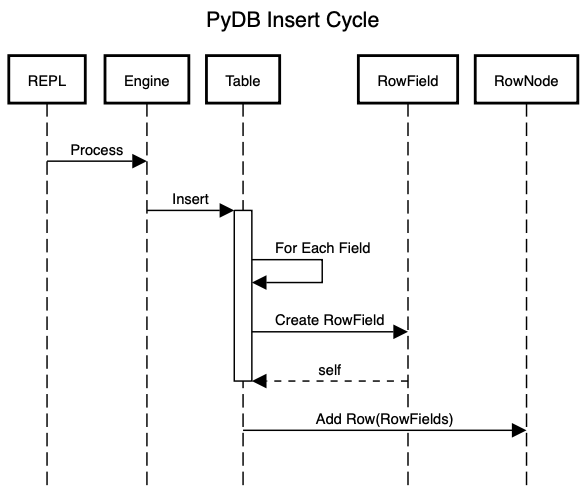
The top level class will be the REPL, which will create and own the Engine. The Engine owns an array of Tables. The Table owns root RowNode, which is a linked list of RowNodes. When commands are issued, the Engine uses the SQLParser to parse the command and then invokes the corresponding internal action method.
When CREATE is used, the Engine first checks that the table isn’t already defined and, if not, then creates the table with the parsed table definition. If it is, it gets the Table from disk and appends it to the Engine.tables attribute.
When SELECT, INSERT, or DELETE is used (and someday, UPDATE), the Engine will find the table and pass the command with parameters to the Table. Below is a sequence diagram of the Insert Cycle:
Components
REPL
The REPL (Read, Eval, Print, Loop) will provide the foundation for starting on our database. We’ll need a main function that prints a prompt to the screen, reads the input and acts on it.
Future functionality will be to have an API that creates the Table array. Better yet, factor the table array out of the REPL and hold it centrally elsewhere that can be used by either the REPL or the API.
To run the repl, use ./pydb.py from the project root directory
Engine
The Simple Database reference uses Sqlite, which uses a “.” to indicate a meta command, such as .table or .exit. I don’t think I want to do that. I would like to have meta-table data with table data so that one could DESCRIBE <table_name> to get table details from the meta-table data. The metadata could be pulled from the Table data in the Table array. Therefore, the Engine module can be simpler than the reference implementation in the Simple Database reference, which processes meta commands and SQL commands differently.
Table
The Table will own a linked list of RowNodes. Each RowNode will contain a RowField, with the name and value of the RowField. The size and type of the RowField is stored in the Table Definition.
Requirements
CREATE <table_name> (<column_name> <column_type>, ...)will create a table with the defined table attributes. Note that the field sizes will be default values.INSERT INTO <table_name> (<column_name1>, ...) VALUES (<value1>, ...)will insert a record into the table with the provided valuesSELECT * FROM <table_name>will select all the records from the table listedDELETE FROM <table_name> WHERE <field> = <value>will delete all the records for which the condition is true. Note that there is only one supported condition for now.
Current Functionality
Currently displays a “db: “ prompt and accepts the commands indicated below. The table is now defined at creation in the Table class. (That needs to be moved to the user.) Display uses the RowField attributes to display the row field value.
Usage:
CREATE TABLE <table_name> (field1 type, field2 type...)wheretypeis eitherintorstringINSERT INTO <table_name> (value1, value2). Note that spaces are not yet correctly handledSELECT * FROM <table_name>DELETE FROM <table_name> WHERE <field> = <value>
Note that multiple tables are supported and persisted to disk.
Next Steps
- Define a size for a Field in Table Create (Done)
- Build a SQL Parser to parse CREATE, INSERT, and SELECT statements (Done)
- Persist created table and rows to disk (Done)
- Implement DELETE (Done)
- Fix the parser to capitalize only the key word tokens (Done)
- Enhance the SELECT to select only requested fields
- Fix the parser to support spaces in data values
- Constrain data to the field size
- Display the size of the field in the SELECT output (Done)
- In order to do this, I would like
Table.create()to take aTableDefinition. TheTableDefinitioncontains the configuration information for each of the columns, each called aField.
- In order to do this, I would like